
How to print a design on canvas
Embroidery has been one of my favorite hobbies since childhood. But lately, it's been hard for me to find a pattern I like. It's important for me to have the design printed directly on the canvas so I can see the boundaries and create my own color compositions (and without it costing a fortune). I found a solution that saves both time and money: printing your own design directly onto the canvas.
What do you need for this?
- canvas;
- heavyweight paper;
- the desired design;
- double-sided tape;
- a printer.
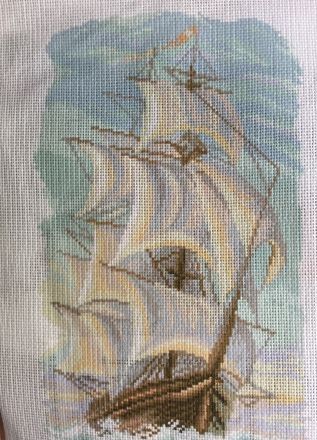
Important! First, set the required size. You can do this in Word or any graphic editor. To print the design, attach the canvas to the heavyweight paper using double-sided tape and simply print it out. I was nervous the first time, but nothing serious can happen—at worst, it might jam and you'll have to pull it out manually. Everything worked out perfectly. The only downside is that the ink rubs off on your hands (since I use an old powder printer). If it were a laser printer, I think it would be different. By the way, at a print shop (where they print t-shirts and such), they recommended using PVA glue instead of tape. And if the canvas is thick, you might need to print it twice. Here is what I got.
Show original
Вышивка - одно из моих любимых занятий с детства. Но сейчас мне сложно подобрать рисунок, который мне нравится. Для меня важно, чтобы рисунок был на самой канве, так я вижу границы и могу создавать свои цветовые композиции. (и чтобы его цена не пару миллионов). И я нашла решение, которое экономит время и деньги. Печать своего рисунка прямо на канве.
Что для этого надо?
- канва;
- плотная бумага;
- нужный рисунок;
- двусторонний скотч;
- принтер.
Важно! Главное сразу установите нужны размер. Сделать это можно в Ворде или любом графическом редакторе.
Чтобы напечатать рисунок, приклейте канву к плотной бумаге на двусторонний скотч и просто распечатайте на принтере. Первый раз и мне было страшно, но ничего серьезного случится не может, максимум - зажует и нужно будет доставать вручную. Но все вышло на ура. Единственный минус - рисунок отпечатывается на руках (так как пользуюсь порошковым старым принтером). Был бы лазерный, думаю было бы иначе.
Кстати в типографии (где печатают футболки и прочее), мне порекомендовали крепить не на скотч, а на клей пва. И если канва плотная, может потребоваться пропечатать все дважды.
Вот что у меня получилось


An excellent option, especially if you're making a bunch of small diagrams for the kids!